
Amazon
Use a reviewed, downloadable asset as a starting point, then confirm that the product category and seller workflow are eligible. Amazon determines whether an asset is accepted and may review the listing or media.
3D ecommerce workflows
Generate from a clear product photo, inspect the result in the browser, then take a downloadable GLB into the platform, theme, or custom storefront you operate. Neyvo3D does not publish to sales channels for you.
Trial models include the Lightweight GLB download. Moving a model into an ecommerce workflow requires the Full-quality GLB from any plan.
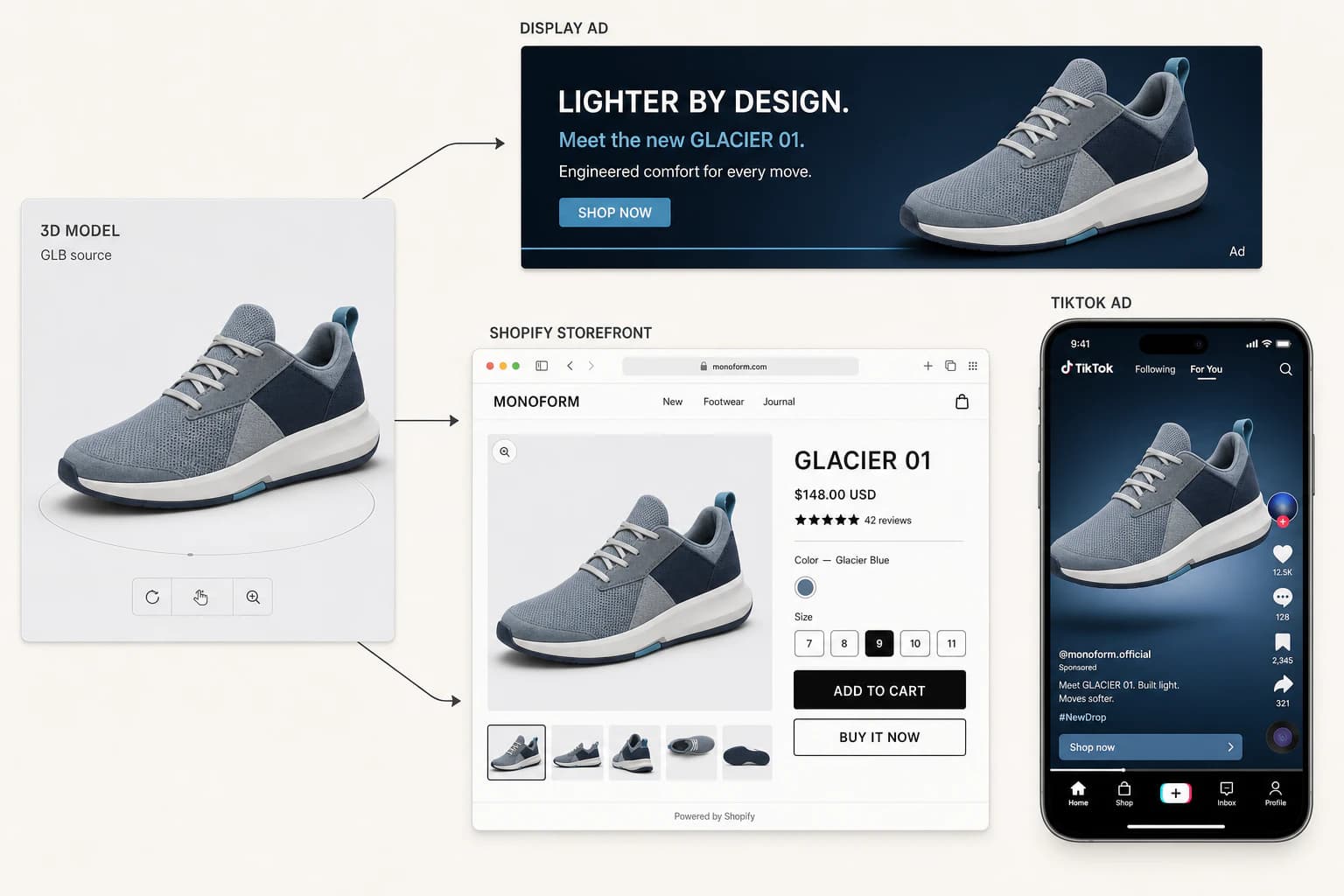
The workflow
Keep creative production, quality review, and channel setup in the right hands.
Start from one clear, front-facing product photo. Build a model for a specific SKU rather than a generic visual concept.
Neyvo3D: generation and a browser preview
Rotate, zoom, and check the surface, silhouette, and scale before the asset reaches your commerce team.
Your team: product accuracy and brand approval
Download an eligible GLB, then add, host, validate, and publish it through the platform workflow you control.
Your platform: theme, hosting, eligibility, and review
Compatibility planning
Use this as a handoff map—not a promise of one-click publishing or automatic approval.
| Channel | What you bring | What the channel controls |
|---|---|---|
| Shopify | A downloadable GLB and approved product details | Theme support, product-media placement, storefront behavior |
| Amazon | An eligible asset and product information | Category eligibility, intake requirements, and review |
| Google Merchant | A publicly reachable asset when required | Country, category, policy, and feed support |
| WooCommerce | A GLB plus your chosen viewer or extension | Extension setup, theme compatibility, and hosting |
| BigCommerce / custom | A GLB and implementation requirements | Theme or custom frontend implementation and delivery |
| Headless storefront | A GLB and a hosted delivery path | Frontend component, CDN, performance, and analytics |
Shopify product 3D workflow
For Shopify 3D product media, the useful handoff is a downloadable model that has been checked against the actual product. Your Shopify administrator still adds product media and verifies the live product page in the active theme.
Important limit
Shopify’s current product-media and theme behavior determines whether and how 3D appears to shoppers.
Beyond Shopify
Use a reviewed, downloadable asset as a starting point, then confirm that the product category and seller workflow are eligible. Amazon determines whether an asset is accepted and may review the listing or media.
Where your Merchant setup supports 3D or AR assets, plan for public hosting and validate your category and country requirements. Google controls policy and feature availability.
A GLB needs a viewer path: choose and configure an extension or implement one in your theme. Test the exact extension, theme, and hosting combination you run.
Use the downloaded asset with your theme or custom implementation. Your development team owns the viewer, delivery, responsive behavior, and release process.
Treat the GLB as a production asset in your content and asset pipeline. Your frontend decides how it is hosted, rendered, measured, and progressively enhanced.
Clear ownership
Before handoff
A model is ready for a channel only after the product and the channel both pass review.
Create the model, check it, and download it only when it is ready for your ecommerce workflow.